Santa Lucia Highlands Wine Artisans
A platform for a sixteen-winery appellation association: a public destination site, a member portal where wineries maintain their own listings, and a custom CMS behind both. Astro pre-renders the public pages and Cloudflare serves them from the edge, so they load on rural signal and a publish re-caches only what changed. Mapbox drives the vineyard atlas and trip planner, and Claude runs the editing assistant and the visitor concierge.
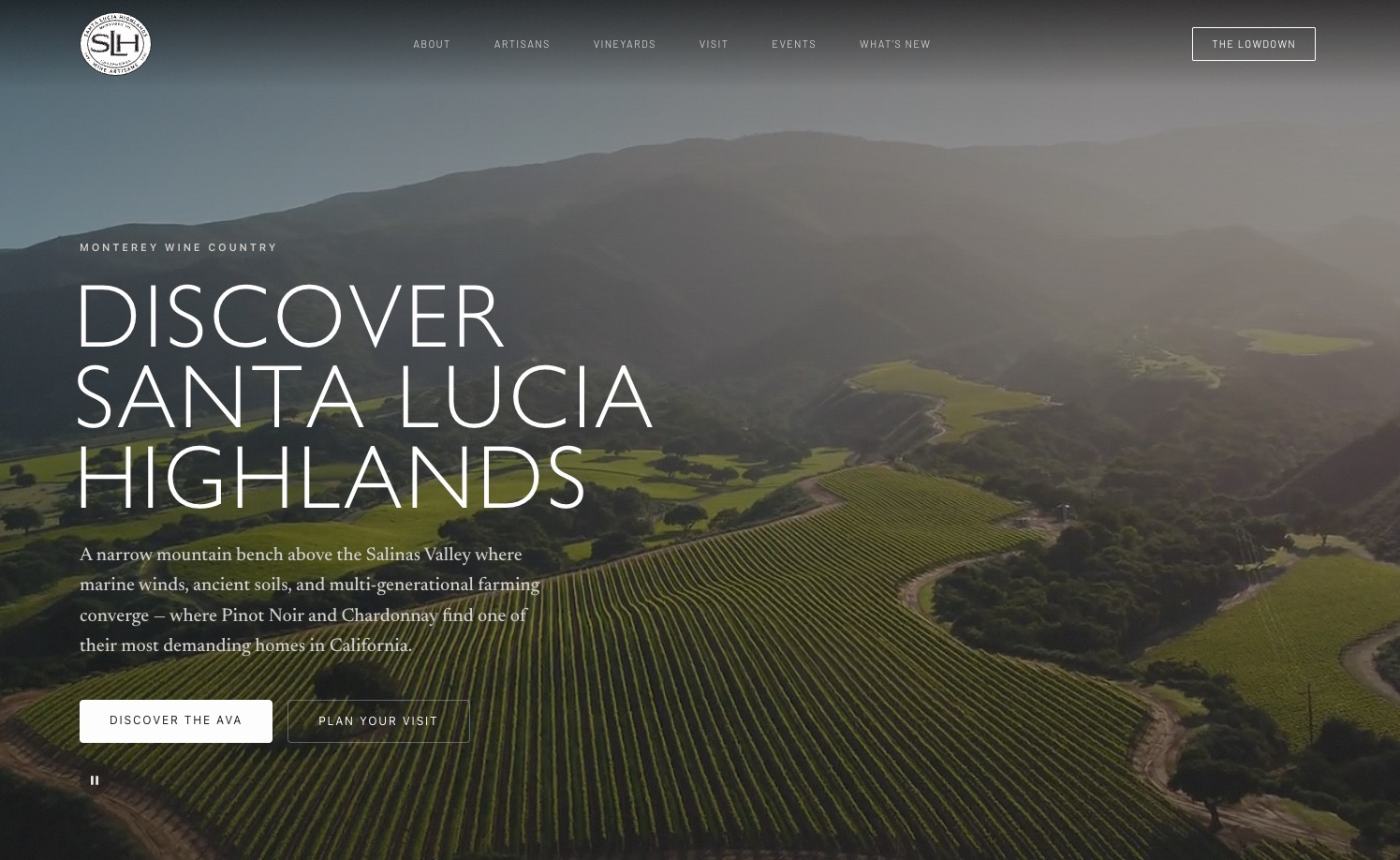
One appellation, three audiences
A visitor planning a weekend, a winery owner updating their own listing, and a two-person staff publishing a magazine's worth of content each month — all served by the same organization, with wildly different needs.
The association had outgrown the usual arrangement: a template website that looked like every other wine site, a spreadsheet holding the member roster, a separate mailing list, and a designer on retainer for every copy change. Member wineries had no way to update their own hours or submit an event without emailing someone. Visitors got a directory, not a reason to drive down.
The site also had to be beautiful. This is a wine region that sells on place and craft; a generic block builder producing generic pages would have undercut the whole point. But beauty maintained by a developer is a recurring bill — the staff needed to build genuinely editorial pages themselves, without a designer standing behind them.
So the brief resolved into three constraints that pull against each other: editorial pages that look art-directed but are assembled by non-designers; self-service for members without giving them the keys to the public site; and a public site fast enough to load over one bar of signal in a vineyard, where a good share of the audience actually is when they look it up.
Three surfaces, one spine
Rather than three products, one system with three doors — every surface reading and writing the same content, governed by the same permissions.
- Public
The destination
Pre-rendered pages that ship almost no code to the browser, with interactivity added only where it earns its weight.
- Delivered as static HTML at build time
- Interactive pieces load on view, on idle, or on demand
- Rebuilt automatically when content is published
- Selective cache invalidation per entity
- Members
The portal
A private application where member wineries maintain their own presence and submit content for review.
- Invite-only access, no public sign-up
- One person may belong to several organizations
- Everything submitted enters a review queue
- Status and notifications tracked in-app
- Staff
The CMS
A content management system built specifically for this organization.
- Visual page builder with live preview
- Region-based templates and reusable sections
- Approvals, revisions, and an activity log
- Built-in SEO, schema, and accessibility auditing
The design decisions that made it possible
- A
Blocks as a design system
Forty-one purpose-built content blocks — cinematic heroes, editorial splits, pull quotes, vintage timelines, itineraries, bento galleries — each with a constrained set of choices. Editors compose; they cannot break the typography.
- B
The editor mirrors the page exactly
Every block exists twice: as a public renderer and as an editor preview built to match it. An automated check refuses to let the two drift apart, so what staff arrange is what visitors get.
- C
Templates with named regions
Page templates define regions — intro, feature, gallery, closing — and blocks live inside them. Structure is guaranteed by the template; content is free within it. Switching templates remaps rather than discards.
- D
Permission at the data layer
Access rules live in the database itself. A member's query physically cannot return another member's drafts, whichever screen it came from.
- E
Static by default, dynamic by exception
Directories, articles, and detail pages are pre-rendered. Maps, filters, carts, and chat hydrate independently. A page with no interactive parts ships no interactive code at all.
- F
Guardrails that run in the build
Block-parity checks, a type-safety budget, and an accessibility gate all run before deployment. Correctness is enforced by tooling rather than by remembering.
- 41 Content block types
- 57 Database tables
- 21 Server-side functions
- 188 Schema migrations
- ~120k Lines of application code
A reason to drive down
Not a brochure and a member list. A destination guide, a magazine, a calendar, a marketplace, and a shop — every page of it editable by staff.
- Home
- Fully composed from blocks, including cinematic video hero with an accessible pause control and reduced-motion fallbacks.
- Artisans
- Member directory with filtering by type — grower, winery, or both — plus rich individual profiles with galleries, tasting details, and linked vineyards.
- People
- Winemakers, growers, and principals as first-class profiles, cross-linked to their organizations.
- Vineyards
- Vineyard directory and detail pages, including multi-owner vineyards and sourcing relationships — which wineries buy fruit from which sites.
- Vineyard Atlas
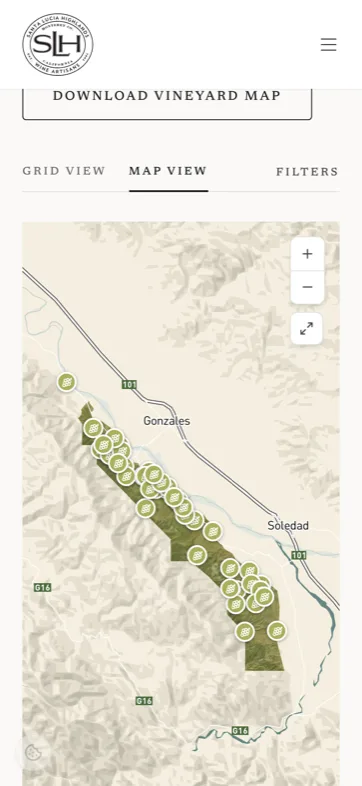
- Interactive map of the appellation over a custom base layer, with filters, selection syncing, and deliberate withholding of private site addresses.
- Visit
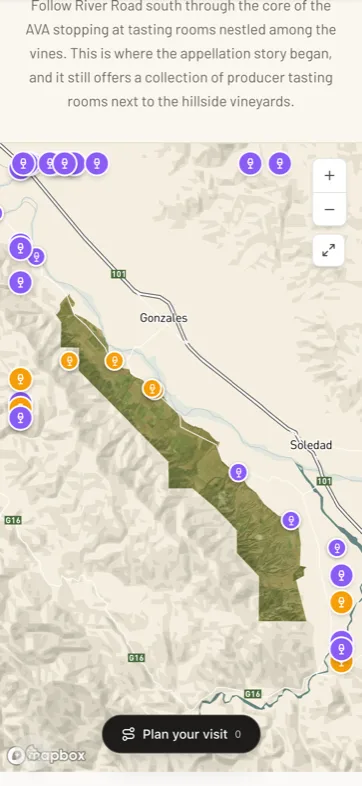
- Trip-planner map layering tasting rooms with curated and live points of interest — dining, lodging, outdoors, attractions — toggled by category.
- Itinerary builder
- Visitors assemble a multi-stop route, set where the day starts, see the drive rendered live, drag to reorder, auto-optimize the sequence, then hand off to their navigation app or email it to themselves.
- AI concierge
- Conversational trip planning scoped to the region — ask for a Saturday of Pinot and a long lunch, get a draft itinerary placed directly on the map.
- Events
- Calendar and list views, featured events, detail pages with ticketing links, and recurring-event support driven by a single rule row rather than duplicated entries.
- Journal
- Long-form editorial with three distinct article layouts, category taxonomy, table of contents, and related-content surfacing.
- News
- Association and member announcements with their own feed and detail treatment.
- Offers
- Member-submitted promotions with date windows, published as a browsable grid.
- Grape marketplace
- Public listings of fruit available for sale by block, variety, tonnage, and vintage — with a private "mark sold" workflow for members.
- Store
- Merchandise catalog, product pages, persistent cart, hosted checkout, and an order confirmation flow.
- Wine trails
- Curated driving routes tying members, vineyards, and points of interest into themed journeys.
- Trade & media
- A dedicated surface for press and trade with downloadable assets and fact-sheet content.
- Newsletter
- Inline signup blocks, a standalone landing page, and a timed pop-up — all writing to the same audience with source attribution.
- Dynamic pages
- Any number of additional pages created by staff, nested into a hierarchy, each choosing from a library of full-page layouts.
- Search & filter
- Client-side filtering across every directory, preserving state in the URL so results are shareable and survive a refresh.
- Error & legal
- Custom 404 and 500 pages, plus legal and policy pages managed as ordinary content.
A page builder with taste
The centerpiece. A drag-and-drop editorial canvas where every arrangement is already on-brand, and the preview is the real thing rather than an approximation.
- 01
Drag-and-drop canvas
Reorder blocks by dragging, insert between any two rows, duplicate, or delete — with clear drop indicators and keyboard-reachable controls.
- 02
Live preview at real widths
Toggle desktop, tablet, and mobile viewports inside the editor and see the actual public rendering reflow.
- 03
Autosave, undo, redo
Continuous draft saving with full undo history and an unsaved-changes guard before navigating away.
- 04
Revision history
Every save snapshots the page. Compare against earlier versions and restore any of them.
- 05
Saved sections
Any arrangement of blocks can be saved as a reusable section and dropped into another page as a starting point.
- 06
Template selector
Two dozen full-page layouts — homepage, dark cinematic, hub landing, journal article variants, timeline, directory — swappable with content remapped between regions.
- 07
Document outline
A live heading tree extracted from block content, exposing structure and flagging skipped heading levels as they happen.
- 08
Focal-point picker
Every background image gets a click-to-set focal point so crops never behead anyone at narrow widths.
- 09
Overlay contrast meter
Text over imagery is measured against the actual image, and warns when the combination falls below the accessibility threshold.
- 10
Rich text with limits
Bold, italic, links, and lists — deliberately no font, size, or color controls, so body copy stays typographically consistent.
- 11
Internal link typeahead
Search live content while linking; internal links resolve to real pages and follow them if a slug later changes.
- 12
Draft preview links
Unpublished pages render at a private preview URL with a visible banner — shareable for sign-off without going live.
The block library
- Cinematic hero
- Fog hero
- Standard hero
- Lead text
- Prose
- Text section
- Editorial split
- Split content
- Three pillars
- Card grid
- Journey cards
- Bento gallery
- Gallery
- Image carousel
- Image
- Video embed
- Cinematic quote
- Pull quote
- Quote
- Stats
- Vintage timeline
- Itinerary
- Itinerary split
- Wine trail links
- Member spotlight
- Event feature
- Tickets
- Journal teasers
- Partner logos
- Stewardship band
- Newsletter band
- Newsletter signup
- CTA banner
- Contact strip
- Callout
- FAQ
- Definition list
- Table
- Download grid
- Heading
- Divider
The hard part of a custom CMS isn't the editor. It's making sure the editor and the page never disagree.
Everything the staff would otherwise email a developer about
Media, navigation, redirects, search appearance, structured data, accessibility — all moved into the interface where the people responsible for them actually work.
- Media library
- Drag-and-drop upload with client-side compression and format conversion before anything leaves the browser, plus tagging, search, folders, and usage context.
- Alt text
- One-click generated descriptions for any image, reviewable and editable, so accessibility isn't gated on someone's patience.
- Image delivery
- Transformed on the fly to modern formats at the exact width requested, with a single hard rule enforced across the codebase.
- Video
- Uploaded background video and embedded marketing video, both with accessible controls and motion-preference handling.
- Navigation editor
- Full control of the header — including mega-menu columns, right-side links, ordering, and nesting — without touching code.
- Footer & identity
- Global footer content, site identity, logos, and social profiles managed as settings.
- Redirects
- A managed redirect table, plus automatic redirect creation whenever any entity's URL changes, so links published elsewhere never rot.
- SEO workspace
- Per-page titles, descriptions, and social images across every content type, with a live analyzer scoring each page and listing what’s missing.
- Social images
- Share images generated automatically from each page’s own hero and headline, refreshed whenever the content changes.
- Structured data
- Machine-readable markup for organizations, places, articles, and events — with a validator screen showing which records are complete.
- Accessibility auditing
- Static analysis of page structure on every load, plus an on-demand automated scan of live pages against the WCAG 2.1 AA ruleset, with results tracked over time.
- Approval queue
- A single inbox for member submissions — approve to publish, or reject with review notes that reach the submitter.
- Promotions calendar
- Events and offers on one timeline in calendar, list, or Gantt view, so overlapping campaigns are visible at a glance.
- Activity log
- Who changed what and when, surfaced both globally and per record.
- Content scheduling
- Publish dates that stamp once and never silently reset, with a separate toggle for whether the date is shown publicly.
- Feedback inbox
- Member-submitted feedback routed to staff with in-app replies.
- Cache control
- Publishing invalidates exactly the pages affected — including pages that merely embed the changed record — rather than rebuilding the world.
- In-app documentation
- A built-in help section explaining the platform's own features to the people using it.
An editor that can be asked
A Claude-powered AI assistant wired directly into the editor's state — not a chatbot bolted onto a sidebar, but a collaborator that reads the page, understands the brand, and proposes changes as reviewable edits. It never publishes on its own; every change waits for a human to approve it.
- 01
Powered by Claude
Built on Claude, streaming its reasoning token by token. Every turn receives the live page — current blocks, metadata, and SEO state — as ground truth, so it works from what's actually on the screen rather than a static prompt.
- 02
Two ways in
A drawer inside the page editor for editing the open page, and a global AI assistant across the admin for questions and drafts that span all content. One backend, two surfaces.
- 03
It edits the page
Insert, replace, remove, and update blocks; rewrite copy in place; change metadata — each proposed as a reviewable diff the editor accepts or discards. Nothing is applied silently.
- 04
It knows the content
Queries live content, searches the media library, reads the events calendar, and pulls content statistics and revision history before it suggests anything — its edits stay grounded in what exists.
- 05
It knows the brand
Voice, tone, and subject-matter expertise are configured in an AI brand-training panel rather than hard-coded — spell out "Santa Lucia Highlands," capitalize grape varieties, keep the Oxford comma. The organization owns how it sounds.
- 06
Schema-aware generation
It authors roughly forty structured block types, never raw HTML — checking each block's schema before it writes, so anything the AI generates snaps into the design system instead of breaking it.
- 07
SEO proposals
Reads the page and drafts titles, descriptions, and share copy against real length limits, scored live — offered for approval, never quietly applied.
- 08
Alt text and captions
A separate AI pass generates accessible alt text and editorial captions on demand — a sparkle button in every media picker, so images arrive described rather than blank.
- 09
Drafts only, by design
The AI can create and edit but never publish or delete — every write lands as a draft for a human to review, and access is limited to editors and admins. Powerful, but never unsupervised.
A concierge that cannot make things up
The second agent faces the other direction. No login, no account — anyone who lands on the Visit page can ask for a day in the appellation and get one, drawn on the map.
Which is exactly why it could not be a chatbot with a wine-country personality. An assistant that recommends a tasting room that closed two years ago, or invents a restaurant that never existed, is worse than no assistant at all for an organization whose members are the product.
So the model never works from memory. Each request builds a candidate list from live data — the association's own member records first, then staff-curated points of interest, then live third-party results for everything a wine trip needs that a winery doesn't provide. The model's only job is to choose among those candidates and write well about them, and the server checks its answer against the same list before the visitor ever sees it.
The result is a plan that reads like a knowledgeable local wrote it, where every place named is a real record the association either owns or vouched for — and where the visitor decides what actually goes into the trip.
- 01
Grounded before it answers
Every request assembles its own candidate list first — member tasting rooms from the association's own tables, curated points of interest maintained by staff, and live dining, lodging, park, and attraction results around the selected trail. The model plans from that list. It has nothing else to plan from.
- 02
It cannot invent a stop
The model may only reference candidates it was handed, and the server re-validates every place in the reply against that same list before it reaches the browser. An unrecognized reference is dropped and the prose around it kept — a hallucination becomes a missing card, never a fake business with a plausible address.
- 03
Members are never ranked
Review scores are stripped from member tasting rooms on the way into the prompt and again on the way out. Ratings appear only on non-member places, labeled as coming from Google. A trade association cannot be in the business of scoring its own membership.
- 04
Prose with real records in it
The model writes markdown and drops a token where a place card belongs. The server splits that into an ordered stream of prose and validated cards — so the answer reads like a person wrote it, while every recommendation stays a real, tappable record with a photo and a link.
- 05
The map follows the plan
A new reply frames the map to the stops it just named and enables exactly the point-of-interest categories it used. It fires once per reply rather than on every render, so returning from the filter panel never overwrites filters the visitor set by hand.
- 06
Proposals, never actions
Each card is its own add-and-remove control, with a single action to accept the whole plan. The agent writes nothing into the itinerary — the visitor does, one tap at a time, exactly as the CMS assistant proposes rather than publishes.
- 07
A conversation, anchored
The chat is bound to a wine trail and persisted in the browser, so it survives switching to the filters, rotating the phone, or closing the tab. Each turn carries the previous reply, so a follow-up refines the plan instead of restarting it — and likely next questions are offered as chips.
- 08
Member-first, and honest about limits
It matches real member data — dog friendly, food on site, walk-ins versus by appointment — and says plainly when something isn't in the data rather than guessing at hours or availability. It never claims it can book anything, and it never points a visitor toward wine outside the member roster.
- 09
Public, so it is bounded
No login means the endpoint is rate-limited per visitor per hour, place lookups are cached for a day in the same table the map reads from, and each plan is one tool-forced call to a fast model rather than a streaming chat. Every failure path degrades to "build it from the map yourself" rather than an error screen.
The hard part wasn't making it sound like a local. It was making it structurally incapable of recommending a place that doesn't exist.
Where the plan lands
The agent is one way into the itinerary builder. Everything it proposes drops into the same route the visitor can build by hand.
- One list, three ways in
- Stops arrive from the agent's cards, from any pin on the map, or from the directories — all landing in the same itinerary.
- Starting point
- Set where the day begins by address, by dropping a pin, or from the device's own location, and the route is drawn from there.
- The drive, rendered
- The route redraws live as stops are added or reordered, with distance and time per leg — debounced so dragging does not fire a request per frame.
- Reorder by hand or by solver
- Drag stops into place, or hand the list to a routing optimizer that solves for the shortest total drive with the starting point held fixed.
- Route sanity checks
- Purely local geometry flags an itinerary with a twenty-five-mile gap between consecutive stops, or one criss-crossing the appellation, and points at the optimizer — instantly, with no API call.
- Off the site
- Hand the finished route to a navigation app, or email it to yourself, formatted and linked for the road.
- It survives the couch
- The itinerary persists in the browser, so a trip planned the night before is still there in the passenger seat.
Self-service, within limits
Members maintain their own presence and submit content — but nothing reaches the public site without passing through review.
- Dashboard
- At-a-glance status of the member's own content, pending submissions, and outstanding actions.
- Profile
- Full control of the organization's public listing — description, imagery, gallery, hours, tasting details, contact, and social links.
- Vineyards
- Members manage the vineyard sites they own or farm, including shared ownership across multiple organizations.
- Event submission
- A guided form producing a fully composed event, previewed exactly as it will publish.
- Offer submission
- Promotions with date windows and terms, submitted for approval.
- News submission
- Member announcements routed through the same review pipeline.
- Submission tracking
- Live status on everything submitted — pending, approved, or returned with notes.
- Grape listings
- Create, edit, and mark-sold fruit listings for the public marketplace, with sale outcomes tracked.
- Team management
- Invite colleagues onto the organization's account, with roles, and remove them when they leave.
- Multi-organization
- One person may sit on several member teams and switch between them; the active organization persists server-side across devices.
- Notifications
- An in-app bell for approvals, rejections, and staff messages.
- Resources
- A private library of association documents, logos, and assets for member use.
- Settings
- Account details, password, and notification preferences.
- Feedback
- A direct channel to staff, answered inside the platform.
Nobody signs up
Membership is a real-world relationship, so the platform models it that way: access is granted, never claimed.
- 01
Invite-only onboarding
No public registration anywhere. Staff issue invite codes with optional expiry and usage limits; accounts are created server-side after validation.
- 02
Bulk organization invites
Onboard an entire roster at once — one code per organization, matched by name so nobody lands in the wrong account.
- 03
Hierarchical roles
Member, editor, and administrator, enforced both in the interface and independently at the data layer.
- 04
Row-level authorization
Every table carries its own access policy. A compromised interface still cannot read what the account isn't entitled to.
- 05
Signup audit trail
Every code redemption is logged with who, when, and against which invite.
- 06
Member lifecycle
Active, lapsed, and archived states cascade correctly — a lapsed member's vineyards leave the public site with them.
- 07
Account recovery
Password reset and activation flows with branded email, handled entirely within the platform.
- 08
Isolated admin surfaces
Authenticated applications deliberately load none of the public site's tracking or marketing code.
Selling, sending, subscribing
A merchandise store, a transactional email system, and a newsletter pipeline — all managed from the same admin, all migrated once already without downtime.
Store
- 01
Catalog management
Products, variants, pricing, imagery, and availability edited in the admin and synced to the payment provider.
- 02
Cart & checkout
Persistent client-side cart handing off to hosted checkout, so card data never touches the platform.
- 03
Order fulfilment
Signed payment webhooks reconcile orders, mark them paid, and trigger confirmation.
- 04
Provider migration
The store was moved wholesale from one payment platform to another mid-life, with the storefront and admin unchanged.
Email & newsletter
- Transactional
- A shared template registry powering every system email — invitations, approvals, rejections, password resets, activations — from one consistent design.
- Preview tooling
- Staff can render any transactional email in the browser before it's ever sent to anyone.
- Team invitations
- Branded invite emails for adding colleagues to a member organization.
- Itinerary email
- Visitors email themselves the trip they just planned, formatted and linked for the road.
- Newsletter signup
- Multiple entry points — inline block, landing page, footer, timed pop-up — writing to segmented audiences with source attribution.
- Article digest
- New journal articles feed an automated email campaign, each with a purpose-generated image compatible with email clients.
- Submission notices
- Automatic notification to members the moment their content is approved or returned.
- Deliverability
- Authenticated sending domain with all system mail routed through a single audited path.
Analytics that answer editorial questions
Standard analytics tells you a page was popular. This tells you which block on that page people actually reached — and stops counting bots while it's at it.
The platform runs its own first-party, cookieless measurement pipeline for every visitor — no consent required, because nothing is stored on the visitor's device. A separate, fully consent-gated layer handles marketing and advertising measurement on top of it, defaulting to denied and only activating what the visitor explicitly grants.
- 01
Editorial dashboard
Traffic over time with publish markers, referral sources, geography, device split, top pages, and dwell time — in the same admin as the content.
- 02
Block-level scroll funnel
How far down each page visitors actually get, measured per block, so a section nobody reaches can be moved rather than rewritten.
- 03
Layout leaderboard
Which block types and layout patterns hold attention across the whole site, aggregated over every page that uses them.
- 04
Consent management
A non-blocking banner with granular categories, a persistent re-open control, and signals honored by every downstream tag.
- 05
Bot defense
Two independent layers of filtering, plus geographic exclusion of known traffic-farm sources, so the numbers reflect people.
- 06
First-party delivery
Measurement is served and routed through the organization's own domain rather than third-party script hosts.
Fast in a vineyard, usable by everyone
The audience is frequently on a phone, on rural signal, outdoors, in bright sun. That set the performance bar — and the contrast bar.
- 01
Pre-rendered pages
The public site is HTML before a visitor asks for it. Interactive components load independently and only when needed.
- 02
Weight budgets
Hero media is compressed and format-converted at upload; images are transformed to the exact width required. Page weight is measured.
- 03
Honest motion
Scroll animations run on cheap properties only, degrade over video and on touch devices, and disappear entirely under reduced-motion preferences.
- 04
Predictive prefetch
Navigation targets are fetched on hover and idle, so tapping through the site feels instant rather than intermittent.
- 05
Contrast, measured
Overlay legibility is computed against the actual image pixels behind the text, flagged in the editor before publish.
- 06
Enforced in CI
An automated accessibility audit runs against deployed pages on every change, with a score floor that blocks regressions from shipping.
The whole appellation, in your pocket
Every surface — public pages, the member portal, and the full content management system — reflows to phone width. Editors are not desk-bound.
Mobile navigation is a full-height panel that slides rather than expands — opaque, instant, and free of the layout thrash that afflicts animated accordions. Maps recenter around the panel that is open. Long forms in the portal collapse into stacked sections with the same validation as their desktop counterparts.
- Home — cinematic hero
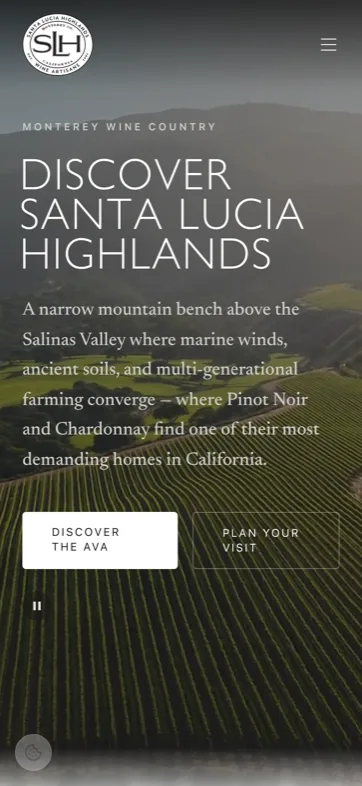
- Atlas — map view
- Visit — trip planner
- Artisans — directory
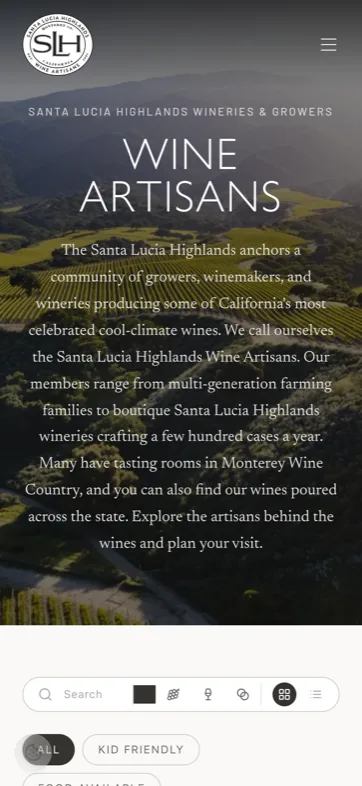
- Journal — The Highlander
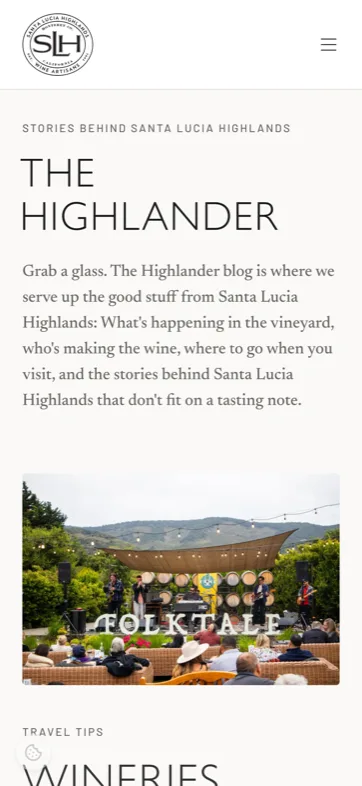
The five screens above are unretouched captures from the live site at phone width — no mockups, no cropping. The member portal and the content management system sit behind authentication and aren't shown here.
One system, no retainer
The association publishes, sells, onboards, measures, and maintains its own website — without a developer in the loop for any of it.
- 01
Content independence
New pages, articles, events, offers, and navigation changes are made by staff in minutes. Nothing about routine publishing requires code.
- 02
Member self-service
Wineries maintain their own listings and submit their own content. Staff review rather than transcribe.
- 03
Consolidation
A template site, a roster spreadsheet, a separate store, a mailing list, and an analytics account collapsed into one platform with one login.
The system has since absorbed a full commerce-provider migration, a domain cutover, a content migration off the legacy site, and the addition of an entire trip-planning product — none of which required rebuilding anything that already existed. That was the actual goal: not a website, but something the organization can keep growing into.
The public site is live
Everything on the public side of the platform is in production — the atlas, the trip planner, the journal, the marketplace, and the shop. The member portal and the content management system sit behind authentication.